DOKI CODE
The workspace browser for developers who do too many things at once.
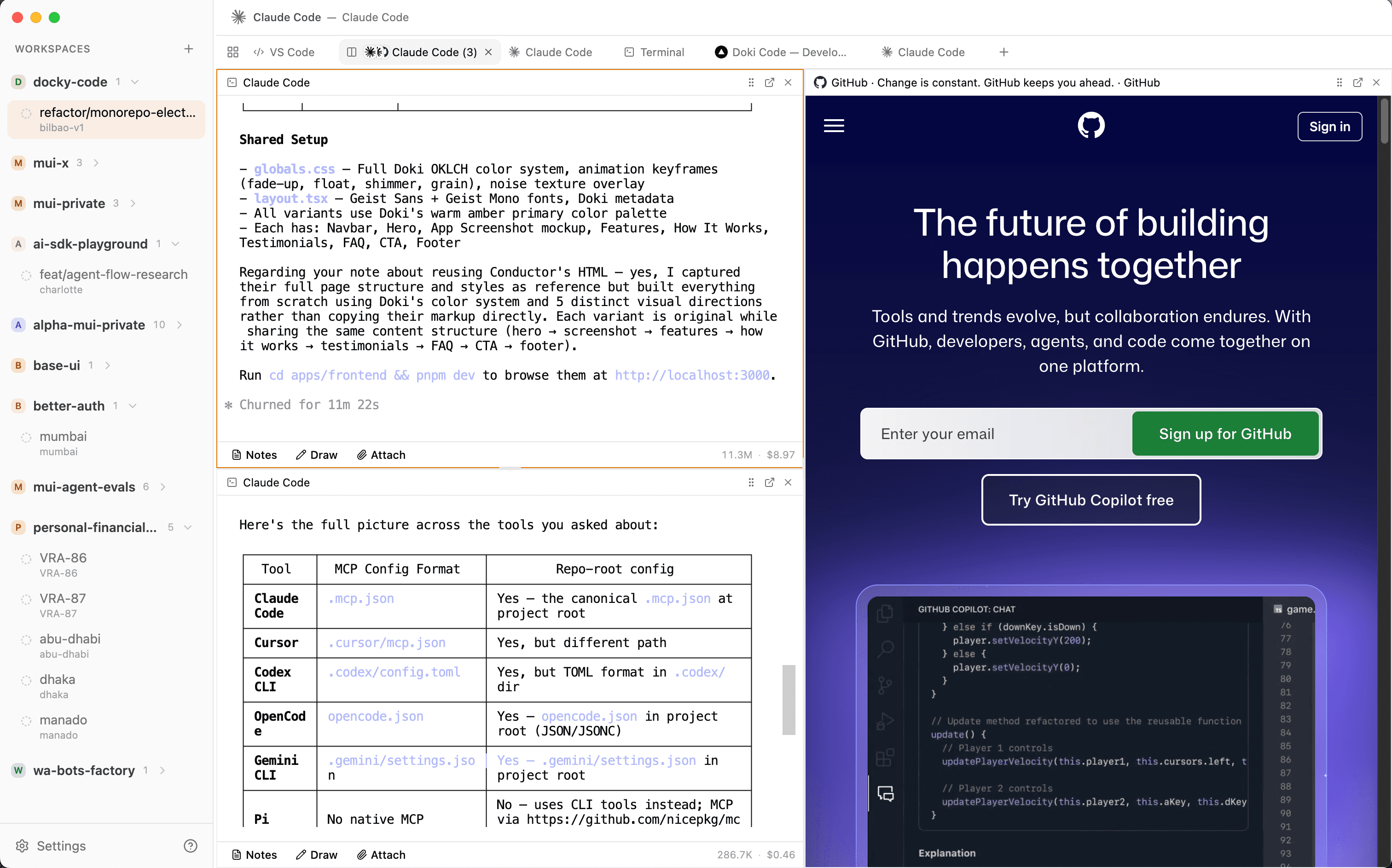
Browser + Terminal + VS Code + AI Agents in isolated git worktree workspaces.
WHAT'S IN THE BOX
WORKSPACES
Each workspace is a git worktree — its own branch, its own directory, fully isolated. Configure services with doki.json, auto-setup ports, and switch contexts instantly. Temporary workspaces for one-off tasks.
BROWSER
Per-workspace Chromium with isolated sessions. Cookies, localStorage, logins — all sandboxed. Configurable search engine, browsing history, and DevTools. Open in external browser with one click.
TERMINAL
Full PTY terminal powered by node-pty. Your shell, your dotfiles, your env. Per-workspace env vars, command history, and session persistence across restarts.
AI AGENTS
Eight built-in agents: Claude Code, Codex, Gemini, GitHub Copilot, OpenCode, Kilo, Cursor, and Cline. Each runs inside your workspace with full branch context. Draw annotations, compose rich markdown, and add your own.
VS CODE
Embedded VS Code per workspace powered by openvscode-server. Your extensions, your settings, theme sync with Doki. Full editor experience without leaving the app.
SPLIT PANES
Split any tab horizontally or vertically. Resize freely, cycle focus, equalize sizes. Nested splits for complex layouts — all persisted per workspace.
SERVICES
Define workspace services in doki.json. Zero-config port allocation, auto-restart with backoff, service discovery, and environment variables. Your dev stack, always running.
STATE PERSISTENCE
Pick up exactly where you left off. Tabs, terminal sessions, browser history, split layouts, agent conversations — everything restored on relaunch. Smart memory governor keeps things fast.
HOW IT WORKS
ADD REPO
Point Doki at any git repo. It sets up the worktree root and detects your repo config. One repo, unlimited workspaces.
CREATE WORKSPACE
Create a workspace for any branch or task. Each gets its own worktree directory, isolated browser session, terminal, VS Code, and AI agents. Define services in doki.json and they spin up automatically.
BUILD & SHIP
Code in VS Code, browse, test with services, and review PRs — all in one window. Track token usage on the stats dashboard, manage tasks on the kanban board, and ship without context switching.
WHAT'S UNDER THE HOOD
Claude Code, Codex, Gemini, GitHub Copilot, OpenCode, Kilo, Cursor, Cline — plus custom agents.
Browser, terminal, AI agent, VS Code, and DevTools tabs. Split any of them.
Tab switching, workspace navigation, split panes, browser controls — all wired up.
LATEST IN v0.2.x
STATS DASHBOARD
Activity heatmaps, token usage charts, cost tracking, and a world map view of your coding sessions.
KANBAN BOARD
Visual task management with drag-and-drop columns, built right into the workspace.
FULL-TEXT SEARCH
Orama-powered fuzzy search across tabs, history, and workspace content. Fast and accurate.
DRAWING CANVAS
Sketch annotations and visual inputs for AI agents directly in the chat composer.
REMOTE ACCESS
Access your workspaces remotely via Cloudflare tunnels. Your machine, from anywhere.
PERFORMANCE
Lazy view creation, idle tab discard, memory governor, and 70% fewer IPC calls. Chromium-inspired optimizations.
WHAT DEVS ARE SAYING
Placeholder testimonial. Replace with a real quote.
@name
Role @ Company
Placeholder testimonial. Replace with a real quote.
@name
Role @ Company
Placeholder testimonial. Replace with a real quote.
@name
Role @ Company
FAQ
+What is a git worktree?
A worktree lets you check out multiple branches of the same repo simultaneously, each in its own directory. No more stashing or switching — every branch is always ready. Doki automates all the worktree setup so you never touch git worktree commands yourself.
+Which AI agents are supported?
Eight agents are built in: Claude Code, Codex, Gemini, GitHub Copilot, OpenCode, Kilo, Cursor, and Cline. Each runs inside your workspace with access to your branch's files and terminal. Agents support streaming responses, tool use with approval workflows, and rich activity rendering. You can also register custom agents with your own commands.
+Can I use VS Code inside Doki?
Yes. Each workspace can open an embedded VS Code tab backed by openvscode-server. Your extensions and themes carry over, and the editor theme stays in sync with Doki. You can configure VS Code settings and extensions from the Settings panel.
+What is doki.json?
doki.json is a per-repo configuration file that defines workspace services — dev servers, databases, background workers. Doki reads it to auto-allocate ports, set environment variables, and restart crashed processes. Drop a doki.json in your repo root and your dev stack spins up with every workspace.
+Is my code stored in the cloud?
No. Everything runs locally on your machine. Your code never leaves your disk. Doki is an Electron app — it's a local-first tool, not a cloud IDE. Optional Cloudflare tunnel support lets you access your workspaces remotely, but data stays on your machine.
+How much does it cost?
Doki Code is free. No trials, no paywalls, no catch.
+Does it work on Linux / Windows?
macOS only for now. Linux is next on the roadmap, with Windows to follow.
STOP CONTEXT
SWITCHING.
v0.5.0— Free forever. macOS only. Linux and Windows coming soon.